


Download Access Denied – Secure Your PC with Advanced Boot Protection
Enhance your computer's security with Access Denied, a powerful yet lightweight Windows-based security tool designed to protect your system at the boot level. This free software, originally released in 2003 and last updated in 2006, offers robust access control by preventing unauthorized users from booting into your system. Ideal for personal and small business use, Access Denied adds a critical layer of protection by locking down the boot process, making it nearly impossible for intruders to bypass your login screen. With over 12,000 downloads and strong usage in India, this software has stood the test of time, proving its reliability and effectiveness in safeguarding sensitive data. Whether you're protecting a home PC, a shared workstation, or a business computer, Access Denied ensures that only authorized users can access your system from the very first boot.
Advanced Boot-Level Security for Maximum Protection
When it comes to protecting your digital assets, most security tools focus on the operating system level—antivirus, firewalls, and encryption. But Access Denied takes a different approach by securing the very first stage of system startup: the boot process. This makes it an essential tool for anyone serious about preventing unauthorized access. Unlike traditional password protection, which can be bypassed through bootable media or system recovery tools, Access Denied operates at a deeper level, ensuring that no one can start your computer without proper credentials. This is especially crucial in environments where physical access to the machine is not fully controlled—such as shared offices, public computers, or homes with multiple users.
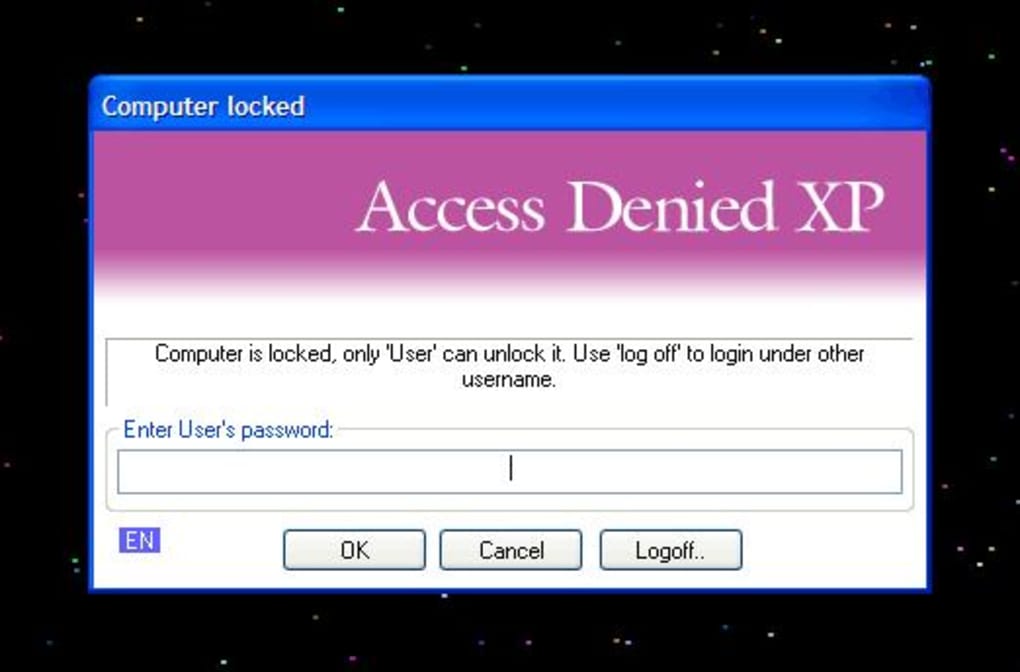
Once installed, Access Denied integrates seamlessly with the Windows boot loader. It intercepts the boot sequence before the operating system loads, presenting a secure login screen that only authorized users can bypass. This prevents even advanced users from tampering with system files or accessing data through live Linux distributions or other bootable tools.
The software is lightweight and doesn’t consume significant system resources, making it suitable for older hardware, including systems running Windows 2000 and earlier versions. Its minimal footprint ensures that your computer boots quickly while maintaining top-tier security. Additionally, the software is entirely free to download and use, making it an accessible solution for users who want strong protection without a subscription or licensing fee.
For users in India and other regions with high demand for affordable security tools, Access Denied has become a trusted name. With over 12,779 downloads since its inclusion in our software library, it continues to serve users who prioritize privacy and control over their devices. While the software hasn’t seen an update since 2006, its core functionality remains effective, especially in low-risk environments where the threat of modern cyberattacks is less prevalent. Still, users should be aware that it may not support newer Windows versions like Windows 10 or 11, so compatibility is key.
Easy Installation and Simple Usage for All Users
One of the standout features of Access Denied is its straightforward installation and intuitive interface. Designed with both beginners and experienced users in mind, the setup process takes less than five minutes. After downloading the installer from a trusted source, simply run the executable file and follow the on-screen prompts. The program doesn’t require any complex configurations or technical knowledge—just a few clicks and you’re ready to secure your system.
Once installed, Access Denied automatically integrates with the Windows boot process. During the first boot after installation, users are prompted to set a master password. This password is the key to accessing the system and must be entered every time the computer starts. The software supports password recovery options (though users should store this information securely), and it allows administrators to manage user access levels. There is no need for additional software or drivers—everything is handled natively by the system, reducing the risk of conflicts or system instability.
Usage is equally simple. After setting up the password, users can boot their computer as usual. If the correct credentials aren’t entered, the system remains locked, and no further boot process occurs.
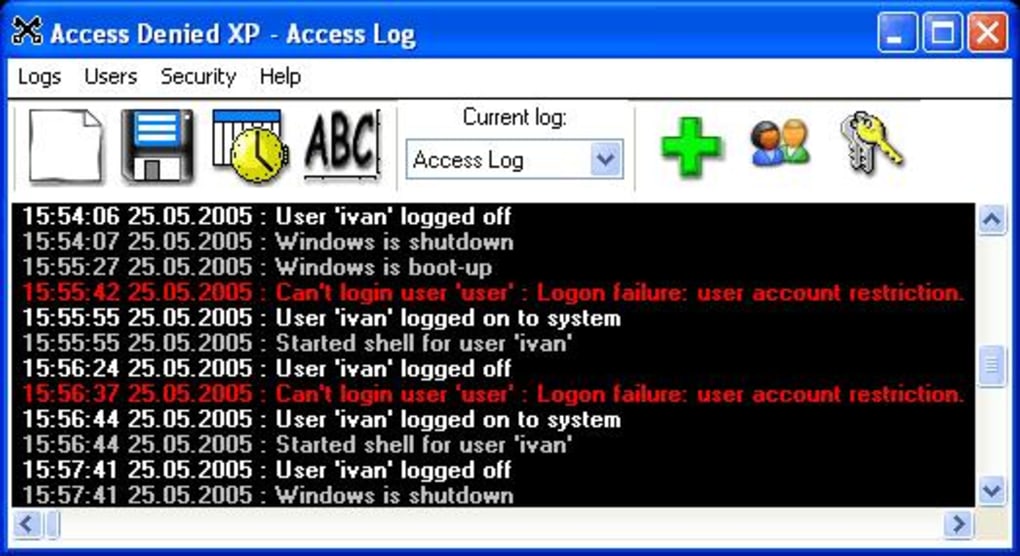
This ensures that even if someone tries to boot from a USB drive or external media, they’ll be blocked at the earliest stage. The software also includes a built-in logging feature that records boot attempts, helping users monitor potential unauthorized access. For those managing multiple devices, the consistent behavior across systems makes it easy to implement a standardized security policy.
Whether you're a home user, student, or small business owner, Access Denied provides a reliable, no-frills way to protect your data from physical tampering.
Compatibility, Features, and Limitations
Access Denied is specifically designed for older Windows operating systems, including Windows 2000 and earlier versions. This means it is not compatible with modern systems like Windows 10, Windows 11, or any version of macOS, Linux, Android, or iOS. Users running newer Windows versions will not be able to install or use this software, which is a significant limitation in today’s tech landscape. However, for legacy systems still in use—especially in educational institutions, government offices, or small businesses with outdated hardware—this tool remains a valuable asset.
Key features of Access Denied include:
- Boot-level access control to prevent unauthorized system startup
- Lightweight design with minimal system resource usage
- Simple setup and password-based authentication
- Support for Windows 2000 and earlier operating systems
- Secure password storage and login logging
- Free to download and use with no hidden fees
Despite its strengths, the software does have notable drawbacks. The last update was in 2006, meaning it lacks support for modern security threats, encryption standards, and multi-factor authentication. It also doesn’t offer cloud backup, remote access, or integration with other security tools. For users seeking a future-proof solution, Access Denied may not be the best fit. However, for those with older systems who need a reliable, no-cost boot protection tool, it delivers solid value.
Pros and Cons
- Pros: Free, lightweight, effective at boot-level protection, simple to use, trusted by thousands of users
- Cons: No support for modern Windows versions, outdated interface, no updates since 2006, limited features
Frequently Asked Questions (FAQ)
Is Access Denied safe to download and use?
Yes, Access Denied is a legitimate and secure software that has been widely used since 2003. It’s free to download and doesn’t contain malware or adware. However, always download from official or trusted sources to avoid tampered versions.
Can I use Access Denied on Windows 10 or Windows 11?
No, Access Denied is not compatible with Windows 10 or Windows 11. It only supports Windows 2000 and earlier versions. For modern systems, consider alternatives like BitLocker or third-party boot protectors.
How does Access Denied protect my computer?
It secures the boot process by requiring a password before the operating system loads. This prevents unauthorized users from booting from external media or accessing system files.
What should I do if I forget my Access Denied password?
Unfortunately, there is no built-in recovery option. It’s crucial to keep your password in a secure location. If forgotten, the only solution may be reinstalling the OS.
Is Access Denied suitable for business use?
It can be used in small business environments with older systems, but due to its lack of updates and modern features, it’s not recommended for high-security or enterprise-level deployments.
Final Verdict: A Nostalgic but Functional Security Tool
While Access Denied may seem outdated by today’s standards, it remains a functional and effective solution for securing older Windows systems. Its ability to lock down the boot process offers a level of protection that many modern tools overlook. For users still running Windows 2000 or similar legacy systems, this free software provides a reliable way to prevent unauthorized access without the need for expensive upgrades.
However, if you’re using a modern operating system, you’ll need to look elsewhere for boot-level protection. Alternatives like BitLocker (built into Windows Pro), VeraCrypt, or third-party tools offer better compatibility, security, and ongoing support. That said, for those with older hardware and a need for a simple, no-cost solution, Access Denied is still worth considering.
Download Access Denied today and take a proactive step toward securing your computer’s boot process—especially if you’re still using legacy Windows systems. Just remember: it’s not for everyone, but for the right user, it’s a powerful, free tool that delivers exactly what it promises.







